Mail in Sync: Restore a unified Gmail inbox for external accounts
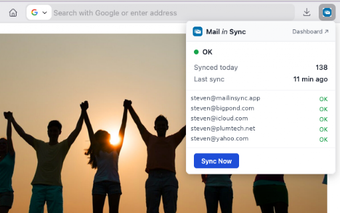
Mail in Sync, from mailinsync.app, restores Gmailify-style account merging so Gmail can host non-Google mail. The extension integrates Outlook, Yahoo and IMAP accounts into the Gmail web interface, syncing messages and folder structures in real time and presenting a single unified inbox inside one browser tab. It preserves Gmail’s native layout while offering unified account management, aimed at Gmail power users and professionals who need consolidated inbox workflows in Chrome.
What is Mail in Sync designed to replace and accomplish?
Mail in Sync is explicitly positioned as a Gmailify replacement, built to bring external accounts into Gmail’s interface. The extension attaches to the Gmail web interface and maps external folders into the same inbox view, so users keep Gmail’s message threading and labels. Supported providers include Outlook, Yahoo and generic IMAP services, which the extension lists as compatible entry points for account consolidation.
How does Mail in Sync behave within Chrome during continuous syncing?
The extension performs real-time synchronization inside the browser environment, so syncing and folder updates occur while Gmail is open in Chrome on desktop platforms. Because it runs as a Chrome add-on, its background activity and network requests are handled by the browser process. The extension’s real-time sync model implies ongoing network use and page updates rather than a separate desktop client.
Who benefits from this approach and where does it not fit?
The tool suits Gmail-centric workflows that rely on a single web interface, especially for users who previously depended on Gmailify. It preserves Gmail’s native layout and keeps users in one tab, which helps professionals managing multiple external addresses. Limitations arise for people who need cross-browser support or a standalone mail client, because the solution is delivered only as a Chrome extension and targets desktop Chrome usage.
Practical replacement for Gmailify, best for Chrome-based Gmail users
Mail in Sync is a pragmatic workaround for Gmail power users who need consolidated inbox management inside Chrome; it replaces a deprecated server-side feature with an extension-based approach. The main trade-off is reliance on a browser extension rather than native account hosting, so verify extension permissions and back up important labels before enabling it. For users committed to Gmail in Chrome, it provides a focused, workable path forward.